Smart Home Automation for Beginners: How to Turn Your “Dumb” Home Genius
Introduction
Starting smart home automation for beginners can feel like learning a foreign language. I still remember buying my first smart bulb five years ago. I screwed it in, downloaded an app, and spent 45 minutes trying to get it to connect to my Wi-Fi. When I finally turned the light blue with my phone, I felt like Tony Stark. But two days later, the bulb disconnected, and I was back to flipping the switch like a caveman.
Many people think a smart home is just expensive toys for tech geeks. But when done right, it is about convenience, security, and energy efficiency. It’s about your house knowing you are awake and starting the coffee maker. It’s about the lights turning off automatically when you leave for work. However, without a plan, you end up with “App Fatigue”—five different apps to control five different devices that don’t talk to each other.
In this comprehensive 1200-word deep dive, I will guide you through the confusing world of protocols (Matter, Zigbee, Z-Wave), help you choose the right “Brain” for your house, and provide a step-by-step smart home automation for beginners roadmap to build a system that actually works.
1. Choosing Your “Brain”: The Ecosystem War
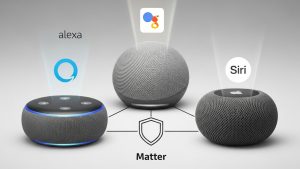
Before you buy a single device, you must pick a team. This is the “Brain” or Voice Assistant that controls everything. Mixing and matching is possible, but staying within one ecosystem makes life easier.
-
Amazon Alexa: Compatible with the widest range of cheap devices. Great for shopping and casual users. The Echo Dot is the gateway drug for many.
-
Google Home: The smartest AI. It answers questions better than Alexa. Best if you are already deep in the Android/Google ecosystem.
-
Apple HomeKit: The most secure and privacy-focused. It is harder to set up and compatible devices are more expensive, but it works flawlessly with iPhones.
The Game Changer: Matter According to the Connectivity Standards Alliance, “Matter” is a new universal language for smart home devices. It allows a Google device to talk to an Apple device locally, without needing the cloud. When buying new gear, always look for the “Matter” logo to future-proof your home.
2. Lighting: The “Gateway Drug” to Automation
Lighting is where everyone starts. But there are two ways to do it, and one is significantly better for large homes.
Method A: Smart Bulbs (e.g., Philips Hue, Lifx)
-
Pros: Color changing, easy to install.
-
Cons: If someone flips the physical wall switch “Off,” the smart bulb loses power and becomes “dumb.” You have to tape the switches open.
Method B: Smart Switches (e.g., Lutron Caseta)
-
Pros: You replace the actual switch in the wall. You can use cheap regular bulbs. The switch works physically and digitally.
-
Cons: Requires basic electrical wiring knowledge (neutral wires).
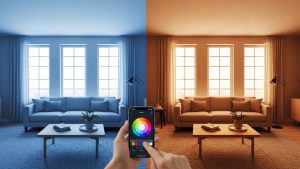
For renters, stick to bulbs. For homeowners, switches are a better investment. Smart lighting allows for “Circadian Rhythms”—lights that start cool and bright in the morning and fade to warm and dim in the evening to help you sleep.
3. The Hub Dilemma: Wi-Fi vs. Zigbee/Z-Wave
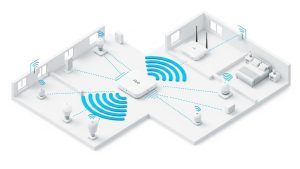
This is the technical part that trips people up. Most cheap smart plugs use Wi-Fi. If you have 50 Wi-Fi devices (bulbs, plugs, cameras) connected to your router, your internet speed will crawl. Your router isn’t designed to handle that many connections.
The Solution: A Hub (Zigbee/Z-Wave) Devices like Philips Hue or Samsung SmartThings use a different radio frequency called Zigbee or Z-Wave.
-
The devices talk to the Hub.
-
The Hub connects to your Router (taking up only one slot). This creates a “Mesh Network.” Each plugged-in device acts as a repeater, strengthening the signal across your house. For a robust smart home automation for beginners setup, investing in a Hub system prevents network congestion.
4. Automating Climate and Security
Once you have lights, move to the high-impact items.
Smart Thermostats: As discussed in our Eco Living guide, devices like the Ecobee or Nest save money. But the automation is key. You can set a rule: “When the last person leaves the house (detected by phone Geofencing), set temperature to Eco Mode.”
Smart Security:
-
Video Doorbells: See who is at the door from your office.
-
Smart Locks: Create temporary codes for dog walkers or guests. No more hiding keys under the mat.
-
Sensors: Put a contact sensor on your front door. If it opens at 3 AM, your lights can flash red and your siren can sound.
5. The Magic of “Routines” (If This, Then That)
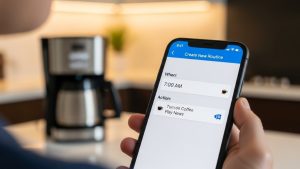
Buying devices is just “remote control.” The real magic is Automation. You don’t want to open an app to turn on a light. You want the house to do it for you.
Essential Routines to Build:
-
“Good Morning”: When you dismiss your alarm -> Blinds open, lights turn on slowly (0% to 100% over 15 mins), weather report plays, coffee maker starts.
-
“Movie Time”: When you say “It’s Movie Night” -> TV turns on, lights dim to 10%, blinds close.
-
“Good Night”: When you say “Goodnight” -> Front door locks, thermostat drops 3 degrees, all lights off, white noise machine on.
Apps like IFTTT (If This Then That) allow you to connect disparate services. For example: “If the Uber arrives, blink the living room lights.”
6. Privacy: Who is Listening?
We must address the elephant in the room. Are these devices spying on you? Smart speakers are always “listening” for their wake word (“Alexa”). Companies state this audio isn’t recorded until the wake word is detected. However, there have been privacy scandals.
How to Protect Yourself:
-
Mute Buttons: Most speakers have a physical mute switch for the microphone. Use it during sensitive conversations.
-
Local Control: Use Apple HomeKit or Hubitat, which process commands locally on the device rather than sending your voice to the cloud.
-
Two-Factor Authentication: Enable 2FA on all your smart home accounts. A hacked camera is a nightmare.
7. Renters vs. Owners: What Can You Install?
For Renters: Stick to “Peel-and-Stick” and “Plug-in.”
-
Smart Bulbs (screw in).
-
Smart Plugs (plug in).
-
Command Strip Sensors.
-
Video Doorbells that clip onto the door (no drilling).
For Owners:
-
Smart Switches (hardwired).
-
Smart Thermostats (wiring involved).
-
Smart Locks (replacing the deadbolt).
Frequently Asked Questions (FAQs)
Q: What happens if the internet goes down? A: This depends on your system. Wi-Fi-based devices (like cheap plugs) will stop working via voice or app, but physical buttons will still work. Hub-based systems (Zigbee/Z-Wave) often have local control, so your automations might still run even without the internet.
Q: Is it expensive to start? A: You can start for $50. Buy one Echo Dot ($30) and two smart bulbs ($20). Expand slowly. Don’t buy everything at once.
Q: Can I mix Alexa and Google? A: You can, but it’s annoying. You’ll forget which speaker controls which light. Pick one “Master Voice” for the whole house.
Q: Do smart plugs save energy? A: Yes! Use them to schedule things like space heaters, curling irons, or coffee makers to ensure they are never left on accidentally.
Conclusion
Mastering smart home automation for beginners is a journey of trial and error. You will have days where the printer goes offline or the lights turn on at 3 AM because of a ghost glitch. But when you walk into your kitchen with your hands full of groceries and the lights turn on automatically because a sensor saw you, you will feel like you are living in the future. Start small, focus on solving actual problems (not just buying cool gadgets), and build a home that works for you.